


Page 25 - Machine installation instructions
P. 25
EN


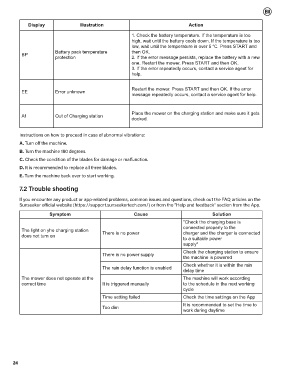
             Display                Illustration                                   Action

                                                          1. Check the battery temperature. If the temperature is too
                                                          high, wait until the battery cools down. If the temperature is too
                                                          low, wait until the temperature is over 5 °C. Press START and
                         Battery pack temperature         then OK.
          BP
                         protection                       2. If the error message persists, replace the battery with a new
                                                          one. Restart the mower. Press START and then OK.
                                                          3. If the error repeatedly occurs, contact a service agent for
                                                          help.


                                                          Restart the mower. Press START and then OK. If the error
          EE             Error unknown
                                                          message repeatedly occurs, contact a service agent for help.


                                                          Place the mower on the charging station and make sure it gets
          A1             Out of Charging station
                                                          docked.


          Instructions on how to proceed in case of abnormal vibrations:
          A. Turn off the machine.
          B. Turn the machine 180 degrees.
          C. Check the condition of the blades for damage or malfunction.

          D. It is recommended to replace all three blades.
          E. Turn the machine back over to start working.

          7.2 Trouble shooting

          If you encounter any product or app-related problems, common issues and questions, check out the FAQ articles on the
          Sunseeker official website (https://support.sunseekertech.com/) or from the "Help and feedback" section from the App.
                       Symptom                             Cause                             Solution
                                                                                 "Check the charging base is
                                                                                 connected properly to the
          The light on yhe charging station   There is no power                  charger and the charger is connected
          does not turn on
                                                                                 to a suitable power
                                                                                 supply"

                                                                                 Check the charging station to ensure
                                             There is no power supply
                                                                                 the machine is powered
                                                                                 Check whether it is within the rain
                                             The rain delay function is enabled
                                                                                 delay time
          The mower does not operate at the                                      The machine will work according
          correct time                       It is triggered manually            to the schedule in the next working
                                                                                 cycle
                                             Time setting failed                 Check the time settings on the App
                                                                                 It is recommended to set the time to
                                             Too dim
                                                                                 work during daytime


       24

