


Page 17 - Machine installation instructions
P. 17
EN

          5..Daily.Operation..                                  Restart the mower: First, power off the machine. Press

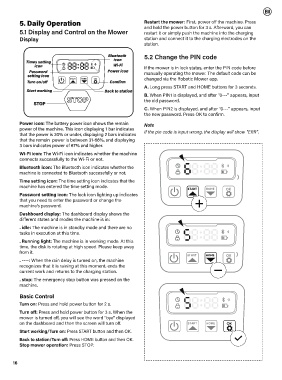
          5.1 Display and Control on the Mower                  and hold the power button for 3 s. Afterward, you can
                                                                restart it or simply push the machine into the charging
          Display                                               station and connect it to the charging electrodes on the
                                                                station.

                                                                5.2 Change the PIN code


                                                                If the mower is in lock status, enter the PIN code before
                                                                manually operating the mower. The default code can be
                                                                changed via the Robotic Mower app.
                                          OK
                                    HOME
                               START
                                                                A. Long press START and HOME buttons for 3 seconds.
                                                                B. When PIN1 is displayed, and after "0---" appears, input
                                                                the old password.

                                                                C. When PIN2 is displayed, and after "0---" appears, input
                                                                the new password. Press OK to confirm.

          Power icon: The battery power icon shows the remain   Note
          power of the machine. This icon displaying 1 bar indicates
          that the power is 30% or under, displaying 2 bars indicates   If the pin code is input wrong, the display will show "ERR".
          that the remain  power is between 31-66%, and displaying
          3 bars indicates power of 67% and higher.
          Wi-Fi icon: The Wi-Fi icon indicates whether the machine
          connects successfully to the Wi-Fi or not.
          Bluetooth icon: The Bluetooth icon indicates whether the
          machine is connected to Bluetooth successfully or not.
          Time setting icon: The time setting icon indicates that the
          machine has entered the time setting mode.
                                                                                  START   HOME     OK
          Password setting icon: The lock icon lighting up indicates
          that you need to enter the password or change the
          machine’s password.
          Dashboard display: The dashboard display shows the
          different states and modes the machine is in:
          . idle: The machine is in standby mode and there are no
          tasks in execution at this time.

          . Running light: The machine is in working mode. At this
          time, the disk is rotating at high speed. Please keep away
          from it.
                                                                                  START   HOME     OK
          . ----: When the rain delay is turned on, the machine
          recognizes that it is raining at this moment, ends the
          current work and returns to the charging station.
          . stop: The emergency stop button was pressed on the
          machine.

          Basic Control

          Turn on: Press and hold power button for 2 s.
          Turn off: Press and hold power button for 3 s. When the
          mower is turned off, you will see the word "bye" displayed
          on the dashboard and then the screen will turn off.                     START    HOME    OK
          Start working/Turn on: Press START button and then OK.
          Back to station/Turn off: Press HOME button and then OK.
          Stop mower operation: Press STOP.


       16

