


Page 15 - Machine installation instructions
P. 15
0.5 m
                                                                                      >30cm
                               0.5 m
                               >30cm
                                                                                                                    EN


                     Neighbor


                                                                                  START   HOME    OK


          NOTE                                                  If the indicator light remains off even when there is power
          - The standard magnetic strip is 5 m long. Please purchase   supplied properly, please contact customer support.
 Neighbor  additional if this is not sufficient for your purposes.
          - This installation guide is not definitive, please use it   WARNING
          according to your situation.                               - DO NOT charge if the machine, the charger, the
          - The magnetic strip should be installed on a flat surface.   charging station, or the power socket is damaged.
          Do not bury the magnetic strip in the soil.                - DO NOT charge the mower when the temperature
                                                                     is above 40 °C (104 °F), or below 5 °C (41 °F). When
          4.5 Charge and Activate the Mower                          the temperature limit is exceeded, the battery will
          Charge the mower                                           not charge.
                                    0.5 m  >30 cm                    - Immediately stop charging if an abnormal smell,
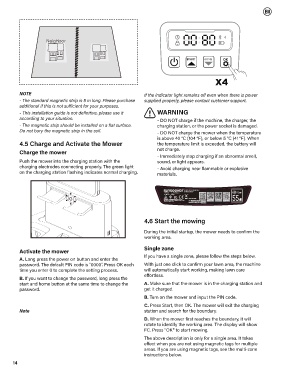
          Push the mower into the charging station with the          sound, or light appears.
          charging electrodes connecting properly. The green light   - Avoid charging near flammable or explosive
          on the charging station flashing indicates normal charging.  materials.
                               >30 cm


                                                                                 ROBOTIC LAWNMOVER
                                                                                 RMV1001M20V
                                                                        20V   n 0 : 2800/min
                                                                        Ø 18 cm    7,8 kg
                                                                             IPX5                     55
                                                                        ZHEJIANG SUNSEEKER INDUSTRIAL CO.,LTD
                                                                        988, Jinde Rd, Jiangdong Industrial Park, Jinhua,   SN:  2401168000XX00000001  MANUAL
                                                                        Zhejiang, 321000, China
                                                                                   Manufacturing date:  01/2024
 >30 cm
 0.5 m                                                          4.6 Start the mowing
                                                                During the initial startup, the mower needs to confirm the
                                                                working area.
 >30 cm
          Activate the mower                                    Single zone

          A. Long press the power on button and enter the       If you have a single zone, please follow the steps below.
          password. The default PIN code is "0000". Press OK each   With just one click to confirm your lawn area, the machine
          time you enter 0 to complete the setting process.     will automatically start working, making lawn care
                                                                effortless.
          B. If you want to change the password, long press the
          start and home button at the same time to change the   A. Make sure that the mower is in the charging station and
          password.                                             get it charged.
                                                                B. Turn on the mower and input the PIN code.
                                                                C. Press Start, then OK. The mower will exit the charging
          Note                                                  station and search for the boundary.
                                                                D. When the mower first reaches the boundary, it will
                                                                rotate to identify the working area. The display will show
                                                                FC. Press "OK" to start mowing.
                                                                The above description is only for a single area. It takes
                                                                effect when you are not using magnetic tags for multiple
                                                                areas. If you are using magnetic tags, see the multi-zone
                                                                instructions below.

       14

